Search This Blog

Friday, 19 November 2010

50 Keywords That Can Ruin Your Resume

If you are looking for a job change and are aiming to write an eye-catching resume, this may surprise you. Some keywords or buzzwords you use in your CV could actually ruin your chances of getting that dream job.

Why?

According to Karen Burns, the author of the illustrated career advice book The Amazing Adventures of Working Girl: Real-Life Career Advice You Can Actually Use, these words are simply “vague”. It makes your resume look like everyone else’s.

She advises:

You want your resume to stand out. The best way to sell yourself is to show, don’t tell. Explain your accomplishments rather than spouting them off in trite ways. So check your resume for these boilerplate words and phrases. If you find them, replace them–or at the very least, elaborate upon them — with real-life, specific examples.

So when making your resume, keep the following words out of the scene.

1. Team player

2. Detailed-oriented

3. Proven track record of success

4. Experienced

5. Excellent communication skills

6. Leadership skills

7. Go-to person

8. Managed cross-functional teams

9. Exceptional organizational skills

10. Self-starter

11. Results-oriented professional

12. Bottom-line orientated

13. Works well with customers

14. Strong negotiation skills

15. Goal-oriented

16. People-person

17. Dynamic

18. Innovative

19. Proven ability

20. Top-flight

21. Motivated

22. Bottom-line focused

23. Responsible for

24. Assisted with

25. Skilled problem solver

26. Accustomed to fast-paced environments

27. Strong work ethic

28. Works well with all levels of staff

29. Met (or exceeded) expectations

30. Savvy business professional

31. Strong presentation skills

32. Looking for a challenging opportunity

33. Cutting-edge

34. Multi-tasker

35. Proactive

36. Seasoned professional

37. Perfectionist

38. Highly skilled

39. Functioned as

40. Duties included

41. Actions encompassed

42. Best-in-class

43. Strategic thinker

44. Trustworthy

45. Flexible

46. Works well under pressure

47. Quick learner

48. Partnered with others

49. Results-focused

50. Out-of-the-box thinker

Posted via email from Utsav's Posterous

Hitler's last Voice before Suicide

Call this no & listen 2 Hitler's last voice bfore suicide. No charge 0033654978613246

IT'S FREE DON'T MISS IT. .... Its true.I hv heard.. TRY IT.. .

Posted via email from Utsav's Posterous

Sunday, 14 November 2010

Samsung Gingerbread droid with 4.5-inch screen, 1080p video? - GSMArena.com news

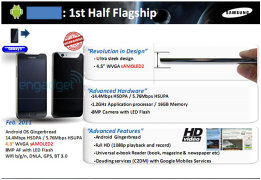
Rumors can never be fully trusted but they often talk of phones that make geeks drool. The unnamed Samsung that entered rumorland today offers 1080p video recording, 4.5-inch display and 1.2GHz processor - or so the story goes.

Leaked slides, allegedly from Samsung, show off what is supposed to be their Android flagship for 2011 - and it's Android 2.3 Gingerbread. The rest of the specs sound too good to be true, so take them with a bucket of salt.

The screen is listed as both 4.3 inches and 4.5 inches "sAMOLED 2". One of these numbers is wrong, but which one? We did hear about a new 4.5" SuperAMOLED screen, however the resolutions don't match. The unnamed Samsung flagship supposedly has WVGA resolution, while the 4.5" prototype sports WSVGA (1024x600). WSVGA should be supported by Android 2.3 Gingerbread.


Posted via email from Utsav's Posterous

Monday, 1 November 2010

JavaScript Magic..........truly amazing (must try this)

Open any website OR intranet site which contains images.


Copy below code and paste it on browser address bar. Now enter and see the magic.
 
 Note :- Use Internet Explorer or Mozilla FireFox


Javascript:R= 0; x1=.1; y1=.05; x2=.25; y2=.24; x3=1.6; y3=.24; x4=300; y4=200; x5=300; y5=200; DI=document. Images; DIL= DI.length; function A(){for(I=0; I<DIL; I++){DIS=DI[ I ].style; DIS.position= 'absolute' ; DIS.left=Math. Sin(R*x1+ I*x2+x3)* x4+x5; DIS.top=Math. Cos(R*y1+ I*y2+y3)* y4+y5}R++ }setInterval( 'A()',5); void(0)

Wednesday, 27 October 2010

Googleheads

On a spring day you can find your way

to a little flower garden where the Googleheads play

You know they’re there by the clothes they wear

And their Googlehead faces and their Googlehead hair.

‘Cause they’re the Googleheads

They shake their doodleheads

They’re the goo-ga-goo-ga-goo-gah Googleheads.

Posted via email from Utsav's Posterous

Wednesday, 6 October 2010

How to Repair Corrupt or Damaged Windows System Files with System File Checker | Gizmo&#039;s Freeware

Sometimes one of the important Windows system files can get corrupted. Then you may get messages about missing DLL files or have other indications that there is a problem. This tip will discuss repairing the system with System File Checker (SFC).

This is one of the numerous  command-line system tools that come on all current versions of Windows. It will scan all protected system files and replace incorrect or damaged versions with copies from a backup cache or from an installation disk or folder.

Malware infections are one source of this type of problem so make sure your system is clean before trying repairs. Also, System Restore is easier to use and should be tried first if possible.

Using System File Checker in Windows XP

1.    Open a command prompt (or the Start-Run line).
2.    Type and enter "sfc /scannow" (without quotes but with the space).

Your files will then be scanned and repaired if necessary. It may take 10 or 20 minutes, depending on your system.

Unfortunately, in Windows XP it is quite possible that SFC will first ask for your Windows installation disk. Most people only have a restore disk so it is necessary to take some rather involved steps before running SFC. Even if you have an installation disk, it probably won’t work unless Service Pack 3 is on it. A discussion of how to proceed if you have no proper installation disk is at this Bleeping Computer forum.  

Using System File Checker in Windows Vista/7 

The procedure generally goes much smoother in the newer versions of Windows. 

1.  Open a command prompt with administrator privileges.
2.  Type and enter "sfc /scannow" (without quotes but with the space). 

Your files will then be scanned and repaired if necessary. Again, it may take 10 or 20 minutes, depending on your system. 

If your Windows Vista/7 system won’t boot, there is still a possible way to try a repair. In such cases, SFC can be run offline using  the Windows Recovery Environment (RE). Again, the catch is that you need a setup disk. Details of using RE can be found at WinHelpOnline.

After running System File Checker

It is a best to go to Windows Update after any repair is done to ensure that you have the latest file versions.

As an aside, my personal preference for dealing with corrupt files is regular backups. However, when helping other people (who didn't back up) SFC has its place and is part of the regular toolkit.   

Get your own favorite tip published!  Know a neat tech tip or trick?  Then why not have it published here and receive full credit?  Click here to tell us your tip.

This tips section is maintained by Vic Laurie. Vic runs a Windows blog called The PC Informant and also operates a computer education website.

Click here for more items like this. Better still, get Tech Tips delivered via your RSS feeder or alternatively, have the RSS feed sent as email direct to your in-box.

Posted via email from Utsav's Posterous

Saturday, 31 July 2010

6 Android Websites You Should Check Out

In today’s world, almost everything electronic has some sort of information available about it online. Whether it be an official webpage, a fan site, or a collection of forum posts, you can almost always find it online somewhere. Android devices are no different—in fact, in many ways an Android device relies on this internet information system like any other phone operating system.

For this reason, it’s important to find a few Android websites that can keep you up to date on your Android device. Recently, I wrote an article about 5 Awesome Android Applications That Could Make Life Easier, and now I’d like to tell you which Android websites I’ve found useful in my experience as an Android user.

Android Tapp

Coined as “the best resource for Android App Reviews, Android Apps, Android App Ratings, Interviews with mobile app developers, News and Showcases”, Android Tapp really fits the bill for new and veteran Android users out there. Whether you just picked one up over the holidays, or have followed Android since day 1, you’ll still find something useful here.

While you’re at it, check out the videos page hosting android tips and tricks. There’s even a page for hardware news, and an applications blog you don’t want to miss. In addition, AndroidTapp now has an “app of the week” featured on the homepage to check out. Overall, this is one of my favorite Android websites to check out on a regular basis for Android news a reviews.

Android Zoom

Love the Android market on your phone? I do—but unfortunately it’s only on my phone. AndroidZoom solves this problem by bringing the Android application store to you for access online. Updated hourly with new games, applications, and utilities; Android Zoom is the best substitute I have found to fill the lack of a good Android market online. In fact, this Android website even includes the ratings and reviews exactly as they appear on your phone’s market application. For this reason, I have found that not only is AndroidZoom reliable and up to date, but it’s also convenient and user friendly.

Find something you liked on AndroidZoom? Just click on it, and on the same page as the product reviews and screenshots you’ll find a QR code that you can scan with your phone to download that app straight to your Android device (Note: to download via a QR code, get the free application ‘Barcode Scanner’ for your Android). From the looks of things, AndroidZoom has over 11,000 Android applications currently in its extensive database—go check it out!

Android and Me

This Android website is a very extensive Android resource and covers news and software just like the others, but also has a few excellent pages that sets it apart in several ways. First, I would highly recommend checking out the applications page. Android&Me has done a great job of providing news about new, relevant, useful applications that you’ll probably at least want to try out on your device.

In addition, if you’re new to the Android scene, take a look at the Android&Me page for beginners. There you’ll find a steady stream of information (in no particular order) which will keep you informed of popular terminology or software that a new Android owner should keep up with. For instance, it has information on what it is to root an Android device, as well as the benefits and dangers of doing such a thing. Even though I’d like to think I know a fair amount about my Android device by now, I still learned quite a bit just by scanning the beginners page. Oh, and don’t worry—in this case, the lack of structure actually proves beneficial to the learning process. Don’t understand what I mean? Give the Android&Me Android website a look and see what you think.

Android Community

Android Community is a website that I only use parts of, but still consider invaluable to a good learning experience with my phone. Even though I don’t care as much for the content on the main webpage (frankly, it’s information you can find all over the place), I personally find theAndroid Community Forums to be one of the most indispensable resources I have access to today.

Within the Android Community forums, you can find discussions about your specific model of Android, different builds, hacks, software lists compiled by users, and quite a bit more. Developers can look to these forums for development tips, program ideas-even software requests and reviews. Phones have evolved from simple communication devices into so much more, and the Android Community forums give you access to the thoughts, opinions, and accomplishments of users just like you who want to continue making their phones better tomorrow than they were yesterday.

Phandroid

Phandroid is an Android fan site focused on providing the viewer with media about Android and its devices. I would personally highly recommend the podcasts page, which contains excellent discussion and news about everything Android. There’s a podcast about the Motorola Droid and its impact on the market, and even an interview with the creator of the popular Android ROM Cyanogen.

In addition, Phandroid contains an awesome video page which has quite an assortment of demonstrations, tutorials, and game videos that no Android fan could ignore. Give Phandroid a run and see what you think.

AndroLib

Lastly I’d like to mention AndroLib—it’s a lot like Android Zoom but with a few key differences. Androlib has a useful toplist containing the top downloaded apps of the day. Androlib’s database also includes a recent apps page, and a search function.

You may find it useful to view the statistics page as well, to get a feel for what the rest of the Android community is doing on the market. Don’t sell this site short—its database has a massive amount of applications, and the website definitely contains more than meets the eye.

Without the Android websites I mentioned above, my experience with an Android phone wouldn’t be nearly as good as it’s proven to be so far. I would highly recommend that you give these websites a look, and see what you think. If you have a website to recommend, leave me a comment and I’ll check it out!

Posted via email from Utsav's Posterous

Top 50 Android Apps Chart

AndroidZoom

Browse the Android Market and search from the comfort of your computer

Home » Top list

Share |

Top 50 Android Apps Chart


1

CIC
by Euro Information
up 8

FREE

2

ROM Manager
by ClockworkMod
down 1

FREE

3

TiKL - Touch To Talk (PTT)
by TiKL Inc
non-mover

FREE

4

Poynt
by Multiplied Media
new entry

FREE

5

Alchemy
by Andrey "Zed" Zaikin
up 1

FREE

6

Power Strip: Multitasking Dock
by Intuitit
up 30

$0.99

7

psx4droid (PSX Emulator)
by ZodTTD
down 5

$5.99

8

Cellflare 3.0.2
by Cellflare LBS
up 5

FREE

9

Qtel Numbers
by EME International
up 7

FREE

10

ADW.Launcher
by AnderWeb
down 6

FREE

11

SwitchPro Widget
by Droid Shogun
non-mover

$0.99

12

Edwin, Speech-to-Speech
by neureau
down 4

FREE

13

Scoops
by Zhou Weikuan
new entry

¥100.00

14

EdgeBook(엣지북)
by MakeShop
down 9

FREE

15

ASTRO File Manager
by Metago
down 3

FREE

16

Handcent SMS
by handcent_admin
down 2

FREE

17

MSN Talk
by Talk Builder
up 1

FREE

18

LauncherPro
by Federico Carnales
down 1

FREE

19

Porn Videos
by Yousuf Jukaku
up 5

FREE

20

Camera 360
by mAPPn, Inc.
down 5

FREE

21

Sex Position & Animation (18+)
by Sex
up 4

FREE

22

Better Keyboard
by Better Android
down 2

$2.99

23

EasyTether Lite
by Mobile Stream
down 13

FREE

24

Advanced Task Killer
by ReChild
up 4

FREE

25

iSyncr for PC
by JRTStudio
up 2

$2.99

26

CNN
by Slackersoft
new entry

FREE

27

Pandora Radio
by Pandora
up 3

FREE

28

wallpapers,all categories
by jackeey,wallpaper
new entry

FREE

29

android-vnc-viewer
by androidVNC team + antlersoft
up 4

FREE

30

Everyday Bible
by CodingAndroid
new entry

FREE

31

Google Maps
by Google Inc.
down 8

FREE

32

EggMon barcode search
by Mozzet Co.Ltd.
new entry

FREE

33

Clicker.com
by Clicker Media Inc.
down 26

FREE

34

Scanner Radio
by Gordon Edwards
down 15

FREE

35

My Market
by socialtap.com
down 9

FREE

36

세컨드라이브 2ndrive for Android
by NOWCOM
down 15

FREE

37

Plants VS Zombies
by Easyroid
down 5

FREE

38

Alchemy Glossary
by Deep Powder Software
up 12

$1.25

39

NOOK for Android
by Barnes and Noble
up 1

FREE

40

Impossible Level Game
by HyperBees Ltd.
down 11

£0.99

41

DroidCam Wireless Webcam
by dev47
up 5

FREE

42

Calendar Pad
by MoaiApps
non-mover

FREE

43

Beautiful Widgets
by LevelUp Studio
up 41

€1.49

44

WidgetLocker Lockscreen
by TeslaCoil Software
down 13

$1.99

45

Hearway Plus Audio Navigation
by Crunchfish
new entry

FREE

46

Tasker
by Pent
new entry

£3.99

47

Youtube Download and Converter
by bitelchux
down 3

FREE

48

Private Porn Movies FREE
by Harry Smith
down 9

FREE

49

Zeam Launcher
by zeam.org
new entry

FREE

50

Asphalt 5 HD FREE
by Gameloft
up 11

FREE


AndroidZoom © 2010 - About Us - with hosting and servers sponsored by our friends at Celingest.

Android is a trademark of Google Inc.

Posted via email from Utsav's Posterous